Spider Man Ai Photo Editing Prompt – You’ve likely noticed everyone easily transforming their photos into superhero-style images—even people with no prior editing experience are posting them. The good news is that you don’t need to master complex settings to create these; you simply need to know the right techniques. I’ll show you how to turn your ordinary photos into Spider-Man-style images—a trend currently taking social media by storm. I’ll explain the process step-by-step; just follow along, and you’ll achieve fantastic results.
About Spider Man Ai Photo Editing Prompt
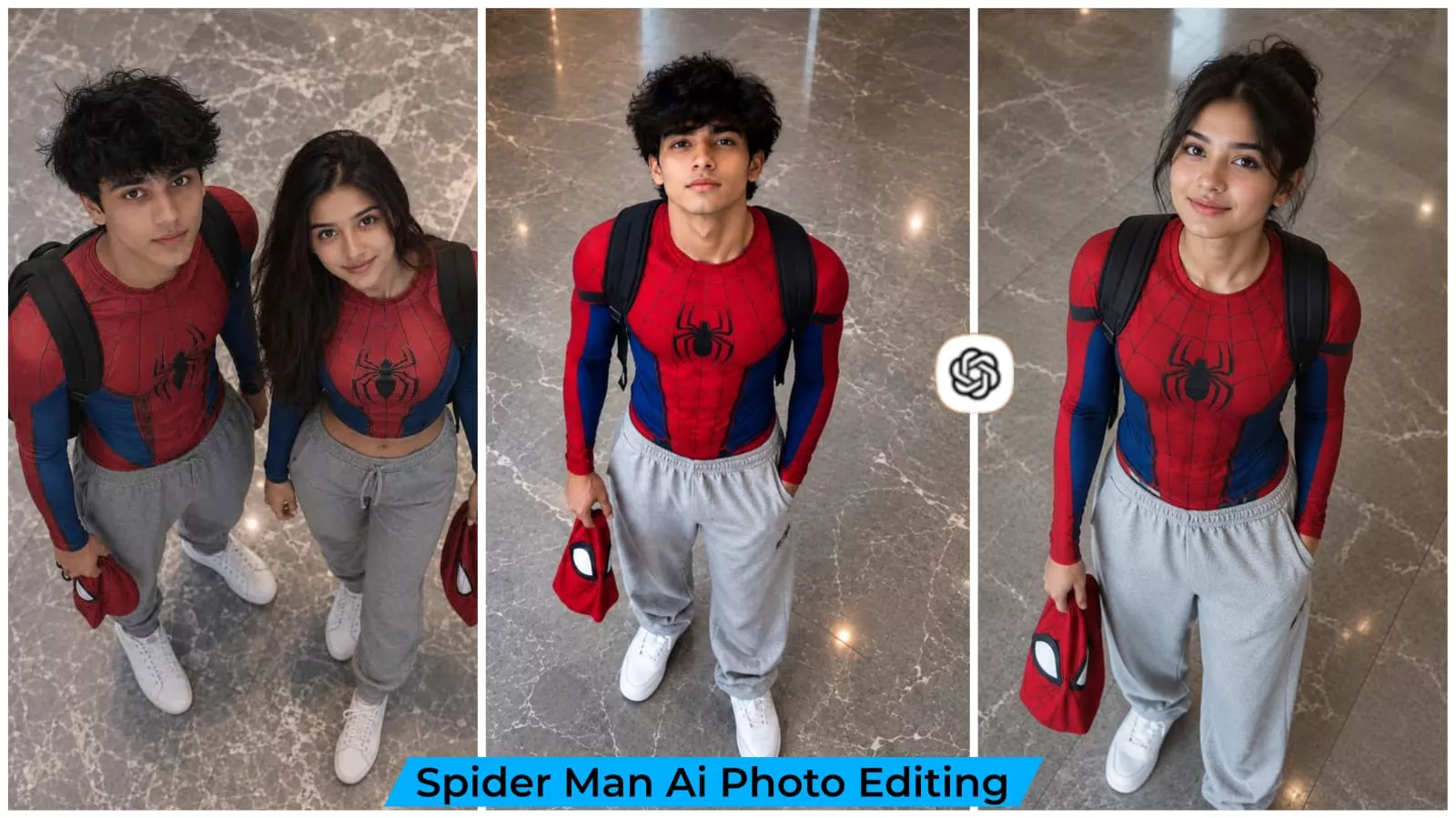
What is the “Spider-Man style” edit? It is a creative editing style that transforms your ordinary photo into a cinematic Spider-Man look, seamlessly altering the image to match the iconic suit. Your face and the background remain intact, while the lighting and other elements adjust automatically to create a completely natural effect. The result is incredibly realistic—you should definitely check it out and let us know what you think.
How To Get Best Result?
To achieve the best results, you need to select the right kind of reference photo. A reference photo plays a crucial role in the editing process. You should choose a high-resolution image where the face is clearly visible and sharp. If you select a photo with a good standing pose and proper lighting, the final result will be far superior, and you will be pleased with the outcome.
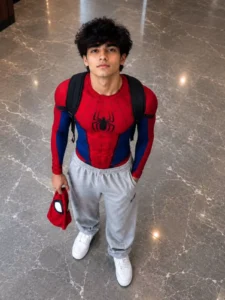
A realistic high-angle full-body shot of a young man with messy, textured black hair looking up at the camera. He is dressed in a red and blue Spider-Man bodysuit on his upper half, but wearing loose casual grey sweatpants on his lower half, white clean canvas shoes. He has a black backpack on his shoulders and is holding a red Spider-Man mask in his left hand. He is standing indoors on a grey marble tiled floor. The lighting is soft and natural, giving a casual "Peter Parker after school" vibe.
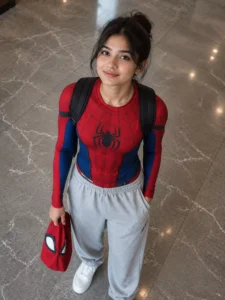
A realistic high-angle full-body shot of a young woman with messy, textured black hair looking up at the camera. She is dressed in a red and blue Spider-Man bodysuit on her upper half, but wearing loose casual grey sweatpants on her lower half, white clean canvas shoes. She has a black backpack on her shoulders and is holding a red Spider-Man mask in her left hand. She is standing indoors on a grey marble tiled floor. The lighting is soft and natural, giving a casual "Peter Parker after school" vibe.
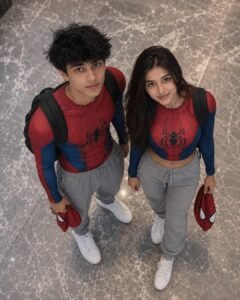
[V31.5 — ULTRA REAL MIRROR SELFIE PROMPT (SPIDERMAN COUPLE + FLASH REALISM)]FACE REFERENCE (HIGHEST PRIORITY)Use uploaded faces as reference.Maintain:face shape jawline nose structure eye shape lip structure skin tone hairline hairstyle natural skin texture STRICT:no beautification no smoothing no face alteration identity must remain 100% real SCENE TYPEIndoor bathroom mirror selfie (casual candid moment).ENVIRONMENT DETAILSbathroom interior mirror in front wall art frames visible neutral wall colors toilet paper roll on wall slightly cluttered realistic environment small dust particles / mirror marks visible SUBJECT POSITIONSfemale in front holding phone male standing slightly behind/right heads close together tight selfie framing POSE DETAILS (CRITICAL)female holding phone with one hand arm slightly extended phone partially covering frame male leaning slightly toward her heads touching lightly female looking at phone screen male looking sideways toward her or camera natural casual pose EXPRESSIONfemale:slightly pout / neutral expression male:playful expression / slight smirk candid non-posed vibe OUTFITSfemale:black spider suit (web pattern) male:red spiderman suit tight fabric with realistic texture CAMERAcamera type: iPhone front camera via mirror lens: wide (~24mm) distance: arm-length angle: straight mirror angle framing: tight crop aspect ratio: 9:16 LIGHTING (CRITICAL)indoor bathroom lighting ceiling lights soft but slightly harsh reflections mild shine on skin NO cinematic lighting SKIN (ULTRA REAL)visible pores slight uneven tone minor blemishes natural shine NO smoothing FABRIC DETAIlspandex texture visible fine web patterns slight wrinkles real reflections from light DEPTH OF FIELDeverything mostly in focus slight softness overall BLUR & IMPERFECTIONvery subtle softness micro blur on edges not perfectly sharp slight camera softness FOCUsslightly imperfect not tack sharp SENSOR EFFECTminor noise slight grain compression artifacts not clean COLORneutral indoor tones slightly warm tint natural white balance imperfections IMAGE IMPERFECTIONSdust on mirror tiny spots minor blur sligt exposure imbalance ANTI-AI ENFORCEMENTNOT ultra sharp NOT polished NO cinematic NOT perfect must feel like real phone selfie IMAGE STYLEreal mirror selfie casual couple moment raw imperfect realism FINAL RESULTmust recreate:same mirror selfie composition same pose same outfits same lighting same environment same casual mood aspect ratio strictly 9:16 IMPORTANT:must look like a real casual mirror selfie with natural imperfections — NOT AI generated
What are the benefits of using Spider-Man-style photos?
Your ordinary snapshots are easily transformed into spectacular superhero-style images that look truly impressive. These are perfect for use as Reel thumbnails or social media posts. You get creative editing results without needing Photoshop, helping you craft eye-catching visuals for social media.
How To Create Image Using Prompt?
We have already shared the prompt for these photos with you; you simply need to use it. First, select and copy the prompt. Then, open ChatGPT—I have provided the link here—or use the browser or app version. Paste the prompt, click the plus (+) icon to upload a reference photo, and hit generate. It will create an excellent image that is ready for you to post on social media.
Conclusion
You can easily create this kind of Instagram trending edit. I’ve explained everything about editing and its details. Simply follow along and create it. Tell us about the result, how you liked it, and how well you understood it. If you didn’t understand it, let us know too, because we’ll try to clarify any points you didn’t understand in the article.